
Top 6 AI Writing Assistant Tools for Research
 Jul 9, 2025 |
 26 Mins Read
Many students and researchers today use artificial intelligence (AI) to help improve their writing. These tools are not only for checking spelling or grammar, but they can help organise ideas, improve sentence structure, and manage citations.
Writers working on research papers often spend extra time editing and citing sources correctly. AI writing assistant tools are designed to support those specific tasks by using advanced language technology.
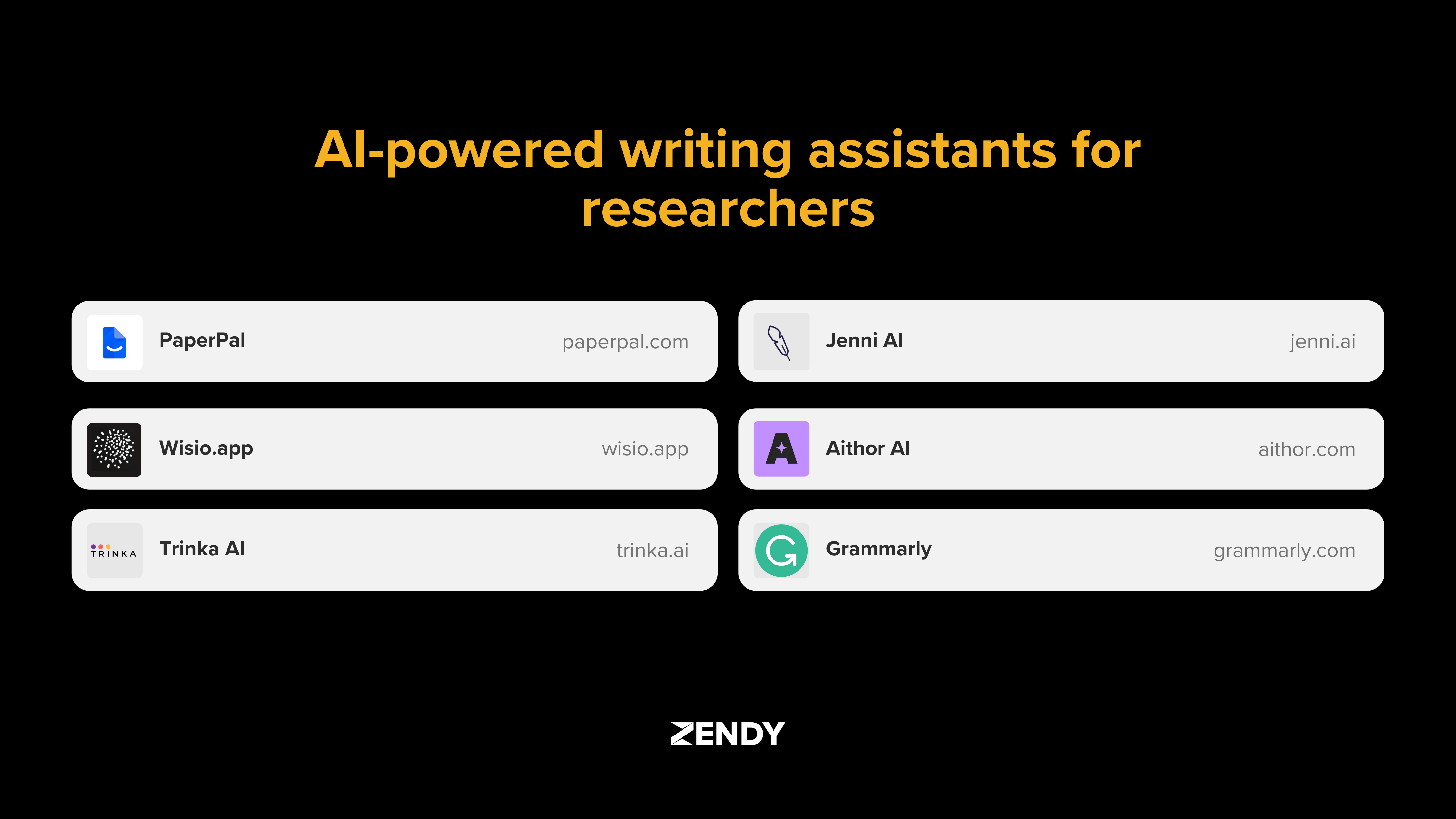
In this article, we explore how AI writing assistant tools like PaperPal, Jenny.AI, Aithor, Wisio.app, Trinka AI, and Grammarly work. Each tool offers a different approach to writing assistance, depending on what kind of research you are doing and what stage you are in.
What are AI Writing Assistant Tools
AI Writing Assistant Tools are software applications that utilise artificial intelligence to enhance writing. They analyse text using machine learning and natural language processing (NLP), which allows them to detect issues with grammar, tone, structure, and clarity.
Natural language processing is a type of AI that helps computers understand and generate human language. This technology allows writing assistants to do more than just catch spelling errors, they can suggest rewording, offer synonyms, and help improve sentence flow.
Early writing tools mainly checked for spelling and punctuation. Over time, they evolved into systems that assist with academic writing, including literature reviews, paper organisation, and citation formatting.
Main benefits of AI writing assistant tools:
- Time Efficiency: These tools speed up writing by suggesting edits and checking grammar in real time.
- Language Enhancement: They improve sentence structure and formal tone for academic audiences.
- Citation Management: Many tools generate citations and apply citation styles automatically.
- Research Workflow: Some AI writing assistant tools help structure research papers by suggesting outlines.
Comparing Key Research Writing Assistants
The table below compares six AI writing assistant tools used in academic research:
| Tool Name | Best For | Key Features | Free Version |
| PaperPal | Journal submissions | Journal formatting, grammar checks | Yes |
| Jenny.AI | Drafting academic content | AI autocomplete, citation generator | Yes |
| Aithor | Structured drafting | Plagiarism detection, writing suggestions | Yes |
| Wisio.app | Peer-reviewed feedback | Human and AI editing, multilingual support | Limited |
| Trinka AI | ESL academic writing | Technical term support, citation formatting | Yes |
| Grammarly | General writing | Grammar checks, browser integration | Yes |
Language Enhancement Capabilities
Each tool approaches grammar, tone, and style differently:
- PaperPal: focuses on academic publishing with discipline-specific language suggestions.
- Jenny.AI: offers real-time assistance through AI autocomplete for academic writing.
- Aithor: helps users draft content with tone guidance and structure prompts.
- Wisio.app: provides detailed editorial feedback tailored to scientific writing.
- Trinka AI: helps non-native English speakers with academic tone corrections.
- Grammarly: covers general grammar improvements but adapts to academic contexts.
Research Focused Features
These tools support research writing in different ways:
- PaperPal: supports journal-specific formatting and citation checks.
- Jenny.AI: generates in-text citations and formats reference lists.
- Aithor: detects unoriginal content and suggests better source integration.
- Wisio.app: allows collaborative editing with structured feedback.
- Trinka AI: identifies missing citations and formats according to style guides.
- Grammarly: includes basic citation suggestions and plagiarism detection.
PaperPal
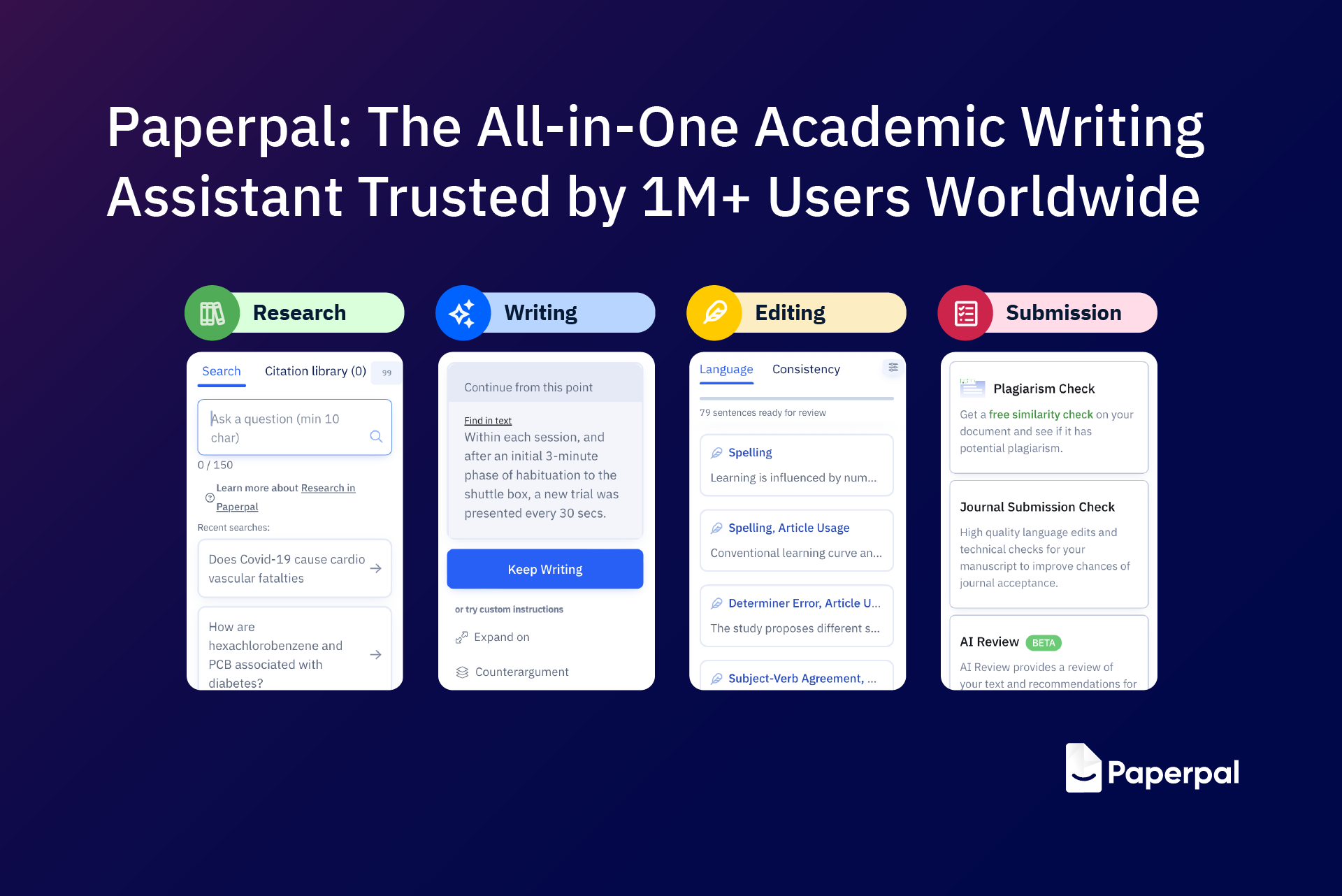
PaperPal is an AI writing assistant tool that mostly focuses on helping researchers prepare academic manuscripts. It is designed to support you with the process of submitting papers to journals by ensuring that writing meets formatting and language requirements.
The tool includes journal-specific formatting options. This allows researchers and students to format their papers according to the guidelines of a selected journal, including structure, citations, and reference styles.
It also provides language support for technical writing by identifying discipline-specific terminology and suggesting corrections to align with academic tone and clarity.
Key features:
- Journal Compatibility: Matches manuscript formatting to journal guidelines, including citation style.
- Technical Language Support: Refines field-specific vocabulary and academic phrases.
- Integration Capabilities: Connects with research tools like Overleaf and Word.
Jenni AI

Jenni AI helps with research-based writing tasks. It drafts academic content, manages citations, and supports the structure of academic arguments.
The platform generates text based on prompts or uploaded documents. It works with academic papers and uses AI to build sections of content that align with your topic.
Jenni AI also includes citation tools that format references in over 1,700 styles. You can save sources in a library and insert citations directly into your draft while writing.
Key features:
- AI-Powered Drafting: Generates academic content from prompts or uploaded research.
- Citation Integration: Supports in-text citations and reference management in multiple formats.
- Collaborative Features: Enables group access to shared libraries and drafts.
Aithor

Aithor supports the academic writing process while helping maintain originality and proper writing practices.
It checks for unoriginal content by comparing written text against existing sources. This helps users revise their work to reduce overlap and avoid academic misconduct.
The platform allows users to add scholarly sources into their documents with an interface for inserting citations and generating references using common academic styles.
Key features:
- Original Content Generation: enhances your writing without compromising your originality
- Academic Integrity Tools: Flags duplicated phrases and offers paraphrasing suggestions.
- Research Integration: Adds peer-reviewed sources and formats them according to guidelines.
Wisio App

Wisio supports academic collaboration by helping researchers work together on documents and improve their work through structured feedback.
The platform includes systems for reviewers to leave targeted comments on drafts. These comments are organised to help writers identify issues with clarity, logic, or formatting.
It also includes tools for managing research projects with task assignments, progress tracking, and draft organisation. Multiple users can edit documents at the same time, seeing changes in real time.
Key features:
- Feedback System: Enables structured peer feedback with in-line comments.
- Workflow Management: Supports task tracking and drafting stages for collaborative projects.
- Collaborative Editing: Allows multiple users to edit a document simultaneously.
Trinka AI

Trinka AI supports writers who speak English as a second language (ESL). Its tools identify grammar and usage issues common among non-native speakers.
The platform recognises technical language from various academic fields such as engineering, medicine, and social sciences. It suggests corrections based on the context of the discipline.
Trinka also supports researchers preparing manuscripts for publication by checking for consistency with international journal standards, including formatting and language clarity.
Key features:
- ESL Support: Offers grammar correction and formal language suggestions for non-native English writers.
- Technical Terminology: Refines field-specific vocabulary across multiple disciplines.
- Publication Standards: Evaluates manuscripts for compliance with journal requirements.
Grammarly

Grammarly helps users write with correct grammar, punctuation, and clarity. It works in academic, business, and casual writing by scanning text for errors and offering real-time suggestions.
For academic writing, Grammarly supports clarity and formal tone by identifying passive voice, informal phrasing, and awkward sentence structure. However, it does not provide research-specific features like citation formatting.
The tool works across emails, web browsers, word processors, and mobile apps. While helpful for basic academic editing, its focus is on general writing improvement rather than specialised research tasks.
Key features:
- Universal Applications: Functions in Word, Google Docs, emails, and browsers.
- Tone Adjustments: Offers suggestions to align writing with academic formality.
- Integration Ecosystem: Works with Chrome, Microsoft Office, and email clients.
How to Choose the Right AI Writing Assistant for Your Research
Selecting an AI writing assistant depends on your specific academic task. Different tools support different aspects of the writing process.
Evaluating Your Writing Goals
Consider what you're writing before choosing a tool:
- For a thesis, look for long-form structuring and reference tracking.
- For journal articles, check for journal-specific formatting and academic tone adjustments.
- For grant proposals, find tools with outlining and collaborative editing features.
Some tools help generate initial drafts, while others focus on editing, formatting, and feedback.
Integrating AI With Existing Tools
AI writing assistant tools work best when they connect with other research tools. Check if the assistant works with reference managers like Zotero or EndNote to maintain accurate citations.
Many platforms integrate with word processors like Google Docs, Microsoft Word, or Overleaf. Others allow importing and exporting in formats such as .docx, PDF, or LaTeX.
Ensuring Academic Integrity
Using AI writing assistant tools raises questions about originality. These tools don't replace human thinking but assist with language and formatting.
To use AI ethically:
- Disclose AI use when required by your institution.
- Review all AI-generated content manually for accuracy.
- Revise AI-generated text before submission.
Empowering Research Writing and Next Steps
AI writing assistant tools have changed how academic writing is planned and processed. These tools help with grammar correction, citation formatting, and research workflow.
In the future, AI writing assistant tools will likely offer deeper integration with citation managers, research databases, and publishing platforms. Some may add voice input, multilingual support, and automatic journal formatting.
Access to reliable academic sources remains essential for these tools to function effectively. Platforms that provide full-text academic content allow AI writing assistant tools to generate accurate citations and summaries. Zendy offers one such environment by combining scholarly content with AI tools that support literature review and citation.
Discover how Zendy's AI-powered research library can enhance your writing workflow at Zendy.io.
How do AI writing assistant tools maintain academic integrity?
AI writing assistant tools do not generate original research or ideas. They improve grammar, structure, and clarity, allowing the writer's own thoughts and arguments to remain central.
Which AI writing assistant offers the best citation management?
PaperPal and Trinka AI include built-in tools for formatting citations in academic styles. Jenni AI supports over 1,700 citation formats and allows integration with reference managers.
Are free versions of these AI writing assistant tools sufficient for research?
Free versions include basic grammar checks but typically exclude advanced features like formatting, citation tools, or deep academic editing. Paid versions provide more comprehensive research support.
Can these tools help with discipline-specific terminology?
Trinka AI and PaperPal recognise subject-specific vocabulary in fields like medicine, engineering, and social sciences. They check for accuracy and consistency in technical language.

Research Integrity, Partnership, and Societal Impact
Research integrity extends beyond publication to include how scholarship is discovered, accessed, and used, and its societal impact depends on more than editorial practice alone. In practice, integrity and impact are shaped by a web of platforms and partnerships that determine how research actually travels beyond the press. University press scholarship is generally produced with a clear public purpose, speaking to issues such as education, public health, social policy, culture, and environmental change, and often with the explicit aim of informing practice, policy, and public debate. Whether that aim is realised increasingly depends on what happens to research once it leaves the publishing workflow. Discovery platforms, aggregators, library consortia, and technology providers all influence this journey. Choices about metadata, licensing terms, ranking criteria, or the use of AI-driven summarisation affect which research is surfaced, how it is presented, and who encounters it in the first place. These choices can look technical or commercial on the surface, but they have real intellectual and social consequences. They shape how scholarship is understood and whether it can be trusted beyond core academic audiences. For university presses, this changes where responsibility sits. Editorial quality remains critical, but it is no longer the only consideration. Presses also have a stake in how their content is discovered, contextualised, and applied in wider knowledge ecosystems. Long-form and specialist research is particularly exposed here. When material is compressed or broken apart for speed and scale, nuance can easily be lost, even when the intentions behind the system are positive. This is where partnerships start to matter in a very practical way. The conditions under which presses work with discovery services directly affect whether their scholarship remains identifiable, properly attributed, and anchored in its original context. For readers using research in teaching, healthcare, policy, or development settings, these signals are not decorative. They are essential to responsible use. Zendy offers one example of how these partnerships can function differently. As a discovery and access platform serving researchers, clinicians, and policymakers in emerging and underserved markets, Zendy is built around extending reach without undermining trust. University press content is surfaced with clear attribution, structured metadata, and rights-respecting access models that preserve the integrity of the scholarly record. Zendy works directly with publishers to agree how content is indexed, discovered, and, where appropriate, summarised. This gives presses visibility into and control over how their work appears in AI-supported discovery environments, while helping readers approach research with a clearer sense of scope, limitations, and authority. From a societal impact perspective, this matters. Zendy’s strongest usage is concentrated in regions where access to trusted scholarship has long been uneven, including parts of Africa, the Middle East, and Asia. In these contexts, university press research is not being read simply for academic interest. It is used in classrooms, clinical settings, policy development, and capacity-building efforts, areas closely connected to the Sustainable Development Goals. Governance really sits at the heart of this kind of model. Clear and shared expectations around metadata quality, content provenance, licensing boundaries, and the use of AI are what make the difference between systems that encourage genuine engagement and those that simply amplify visibility without depth. Metadata is not just a technical layer: it gives readers the cues they need to understand what they are reading, where it comes from, and how it should be interpreted. AI-driven discovery and new access models create real opportunities to broaden the reach of university press publishing and to connect trusted scholarship with communities that would otherwise struggle to access it. But reach on its own does not equate to impact. When context and attribution are lost, the value of the research is diminished. Societal impact depends on whether work is understood and used with care, not simply on how widely it circulates. For presses with a public-interest mission, active participation in partnerships like these is a way to carry their values into a more complex and fast-moving environment. As scholarship is increasingly routed through global, AI-powered discovery systems, questions of integrity, access, and societal relevance converge. Making progress on shared global challenges requires collaboration, shared responsibility, and deliberate choices about the infrastructures that connect research to the wider world. For university presses, this is not a departure from their mission, but a continuation of it, with partnerships playing an essential role. FAQ How do platforms and partnerships affect research integrity?Discovery platforms, aggregators, and technology partners influence which research is surfaced, how it’s presented, and who can access it. Choices around metadata, licensing, and AI summarization directly impact understanding and trust. Why are university press partnerships important?Partnerships allow presses to maintain attribution, context, and control over their content in discovery systems, ensuring that research remains trustworthy and properly interpreted. How does Zendy support presses and researchers?Zendy works with publishers to surface research with clear attribution, structured metadata, and rights-respecting access, preserving integrity while extending reach to underserved regions. For partnership inquiries, please contact: Sara Crowley Vigneau Partnership Relations Manager Email: s.crowleyvigneau@zendy.io .wp-block-image img { max-width: 65% !important; margin-left: auto !important; margin-right: auto !important; }

Beyond Publication. Access as a Research Integrity Issue
If research integrity now extends beyond publication to include how scholarship is discovered and used, then access is not a secondary concern. It is foundational. In practice, this broader understanding of integrity quickly runs into a hard constraint: access. A significant percentage of academic publishing is still behind paywalls, and traditional library sales models fail to serve institutions with limited budgetsor uneven digital infrastructure. Even where university libraries exist, access is often delayed or restricted to narrow segments of the scholarly record. The consequences are structural rather than incidental. When researchers and practitioners cannot access the peer-reviewed scholarship they need, it drops out of local research agendas, teaching materials as well as policy conversations. Decisions are then shaped by whatever information is most easily available, not necessarily by what is most rigorous or relevant. Over time, this weakens citation pathways, limits regional participation in scholarly debate, and reinforces global inequity in how knowledge is visible, trusted, and amplified. The ongoing success of shadow libraries highlights this misalignment: Sci-Hub reportedly served over 14 million monthly users in 2025, indicating sustained and widespread demand for academic research that existing access models continue to leave unmet. This is less about individual behaviour than about a system that consistently fails to deliver essential knowledge where it is needed most. The picture looks different when access barriers are reduced: usage data from open and reduced-barrier initiatives consistently show strong engagement across Asia and Africa, particularly in fields linked to health, education, social policy, and development. These patterns highlight how emerging economies rely on high-quality publishing in contexts where it directly impacts professional practice and public decision-making. From a research integrity perspective, this is important. When authoritative sources are inaccessible, alternative materials step in to fill the gap. The risk is not only exclusion, but distortion. Inconsistent, outdated, or unverified sources become more influential precisely because they are easier to obtain. Misinformation takes hold most easily where trusted knowledge is hardest to reach. Addressing access is about more than widening readership or improving visibility, it is about ensuring that high-quality scholarship can continue to shape understanding and decisions in the contexts it seeks to serve. For university presses committed to the public good, this challenge sits across discovery systems, licensing structures, technology platforms, and the partnerships that increasingly determine how research is distributed, interpreted, and reused. If research integrity now extends across the full lifecycle of scholarship, then sustaining it requires collective responsibility and shared frameworks. How presses engage with partners, infrastructures, and governance mechanisms becomes central to protecting both trust and impact. FAQ: What challenges exist in current access models?Many academic works remain behind paywalls, libraries face budget and infrastructure constraints, and access delays or restrictions can prevent researchers from using peer-reviewed scholarship effectively. What happens when research is inaccessible?When trusted sources are hard to reach, alternative, inconsistent, or outdated materials often fill the gap, increasing the risk of misinformation and weakening citation pathways. How does Zendy help address access challenges?Zendy provides affordable and streamlined access to high-quality research, helping scholars, practitioners, and institutions discover and use knowledge without traditional barriers. For partnership inquiries, please contact:Sara Crowley VigneauPartnership Relations ManagerEmail:s.crowleyvigneau@zendy.io .wp-block-image img { max-width: 65% !important; margin-left: auto !important; margin-right: auto !important; }

Beyond Peer Review. Research Integrity in University Press Publishing
University presses play a distinctive role in advancing research integrity and societal impact. Their publishing programmes are closely aligned with public-interest research in the humanities, social sciences, global health, education, and environmental studies, disciplines that directly inform policy and progress toward the UN Sustainable Development Goals. This work typically prioritises depth, context, and long-term understanding, often drawing on regional expertise and interdisciplinary approaches rather than metrics-driven outputs. Research integrity is traditionally discussed in terms of editorial rigour, peer review, and ethical standards in the production of scholarship. These remain essential. But in an era shaped by digital platforms and AI-led discovery, they are no longer sufficient on their own. Integrity now also depends on what happens after publication: how research is surfaced, interpreted, reduced, and reused. For university presses, this shift is particularly significant. Long-form scholarship, a core strength of press programmes, is increasingly encountered through abstracts, summaries, extracts, and automated recommendations rather than sustained reading. As AI tools mediate more first encounters with research, meaning can be subtly altered through selection, compression, or loss of context. These processes are rarely neutral. They encode assumptions about relevance, authority, and value. This raises new integrity questions. Who decides which parts of a work are highlighted or omitted? How are disciplinary nuance and authorial intent preserved when scholarship is summarised? What signals remain to help readers understand scope, limitations, or evidentiary weight? This isn’t to say that AI-driven discovery is inherently harmful, but it does require careful oversight. If university press scholarship is to continue informing research, policy, and public debate in meaningful ways, it needs to remain identifiable, properly attributed, and grounded in its original framing as it moves through increasingly automated discovery systems. In this context, research integrity extends beyond how scholarship is produced to include how it is processed, surfaced and understood. For presses with a public-interest mission, research integrity now extends across the full journey of a work, from how it is published to how it is discovered, interpreted and used. FAQ Can Zendy help with AI-mediated research discovery?Yes. Zendy’s tools help surface, summarise, and interpret research accurately, preserving context and authorial intent even when AI recommendations are used. Does AI discovery harm research, or can it be beneficial?AI discovery isn’t inherently harmful—it can increase visibility and accessibility. However, responsible use is essential to prevent misinterpretation or loss of nuance, ensuring research continues to inform policy and public debate accurately. How does Zendy make research more accessible?Researchers can explore work from multiple disciplines, including humanities, social sciences, global health, and environmental studies, all in one platform with easy search and AI-powered insights. For partnership inquiries, please contact:Sara Crowley Vigneau Partnership Relations Manager Email: s.crowleyvigneau@zendy.io .wp-block-image img { max-width: 65% !important; margin-left: auto !important; margin-right: auto !important; }
Address
John Eccles HouseRobert Robinson Avenue,
Oxford Science Park, Oxford
OX4 4GP, United Kingdom